
Exporting your Documentation from Active Oversight
October 2019
Overview
One thing that is great about Active Oversight, is that it is a single source of truth for all of the data and documentation that is collected for each of your Projects. If you ever need to access those raw documents and export them for further needs, you can do so straight from AO.
Watch Our Help Video To Learn How To!
Access The Plan Of Record:
- Log into Active Oversight
- Navigate to the Plan of Record.

Access Your Project:
- Search for the Location where the Project was completed
- You can do so by scrolling through your locations or you can use the search box to type in the Location name.
- Once you have found the Location, click on the Location name and then select the Project

Export Your Closeouts
- Selecting that Closeout(s)from your list that you wish to export
- Select download

Export Your Raw Documentation
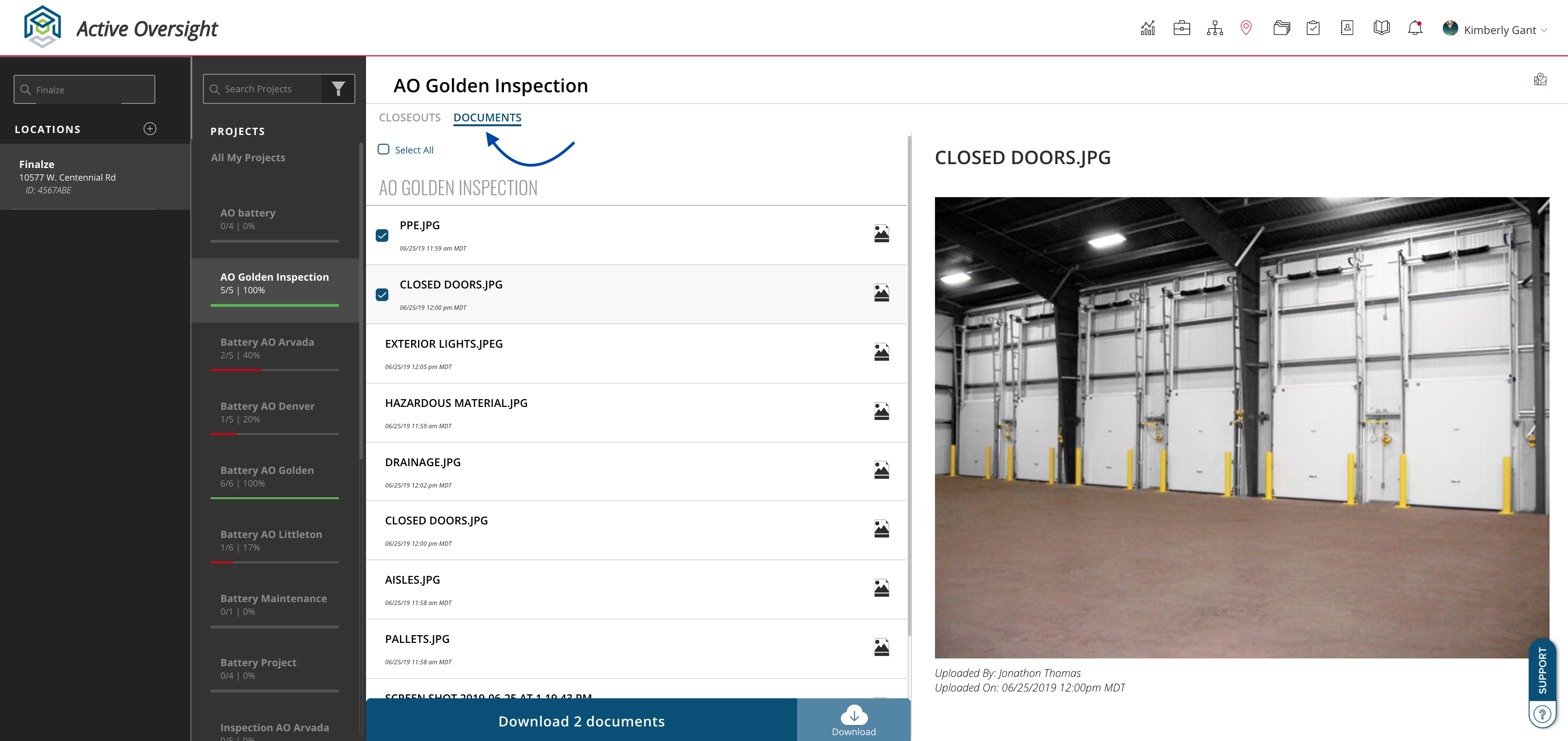
- Selecting the Documents Tab
- Select All or choose individual documents to export
- Once your documents are selected, click Download at the bottom of your screen
- Your downloads will then turn into a zip file for you to use as you wish
Do you have additional questions? Contact us at activeoversight@finalze.zendesk.com.
Comments
0 comments
Please sign in to leave a comment.