
Active Oversight Release Announcement
1.33.0 | September 17, 2019
Overview:
This release was full of exciting new enhancements to simplify and streamline your work using Active Oversight. Not only did we make some great updates to our notifications, but we’ve also added an easy way for you to contact us through your mobile app, created excel Closeouts, and fixed a bunch of pesky bugs! Check out the full list below to find out all the juicy details!
What's New:
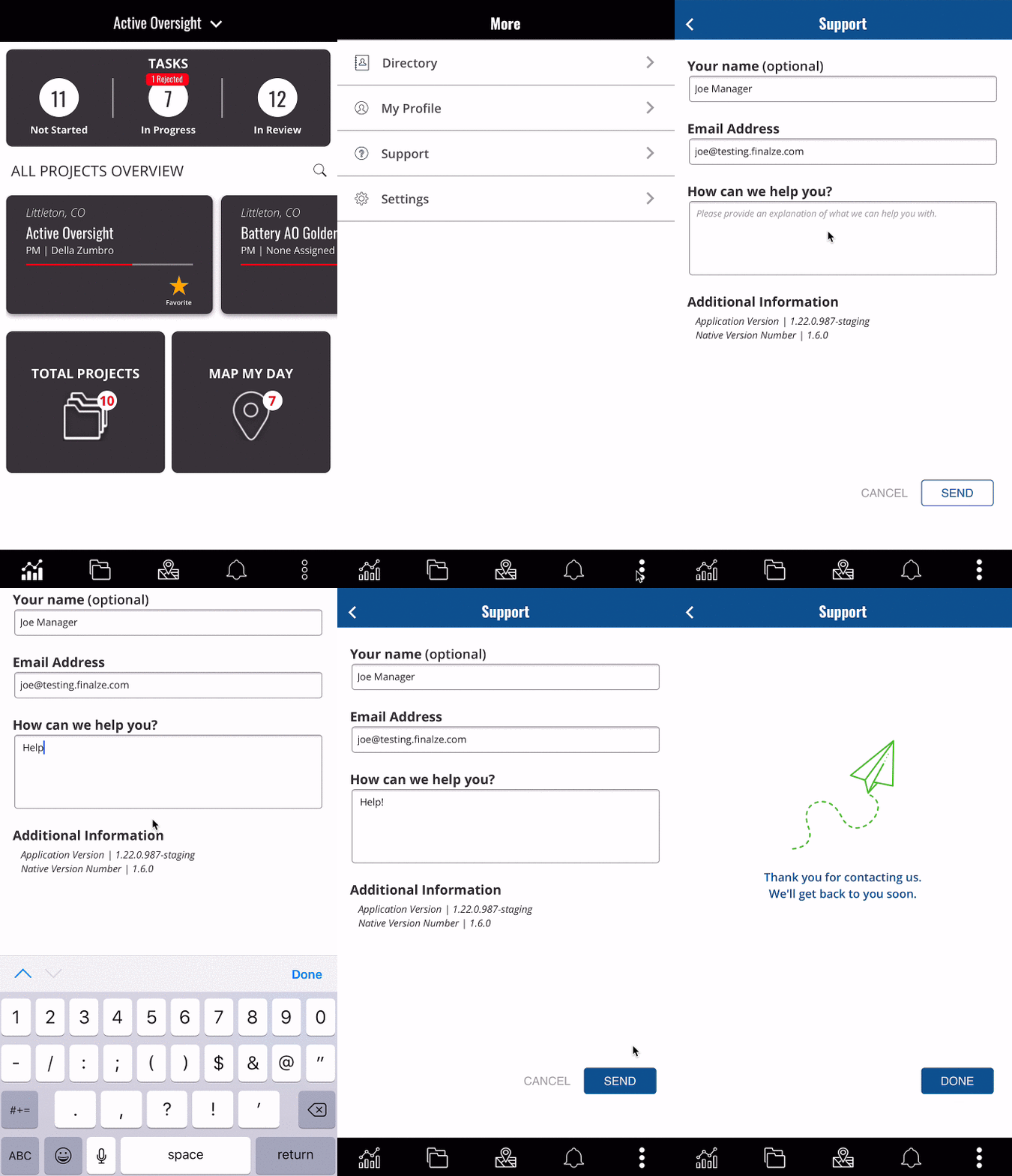
- In-App Support on Mobile: You can now easily contact our Support team or send us your questions through our new Support feature on mobile.
- Add date and time to photos that are downloaded: When you download your photos from the Plan of Record, we now include the user who uploaded the photo, the date, and the timestamp on the photo itself.
- Task Started Notification: Have you ever been interested as to when your crew is on-site? No need to wonder anymore. We’ve added the ability to get a notification when a Task has started. Simply add yourself to the Notify section under a Task!
- Allow Vendor users to view Project Analysis Report: If you are working on behalf of another company, you will now be able to take full advantage of Project reports for any Project that you are a member of.
- Ability to replace Project Manager and Project level Notify: Replacing someone who is assigned as a Project Manager or Notify After Completion at the Project level will now also replace that assignment.
- Excel Closeout: We now allow you to export a Closeout as an excel format! Want to know more? Contact us at support@activeoversight.io.
- Notification Pips: We want to make sure that you are always up to date with your work. That’s why we’ve added a pip indicator on your Active Oversight app and a Notification bell on your app badge when you have unread notifications.
- Ability to customize how you want to receive Notifications: Whether it be through an email or a Push Notification, you now have the freedom to choose which way. Check out our help article to see how!
What We Improved:
- Ability to hide N/A Completion Steps on your Closeout: Are your Closeouts extremely long due to the large number of Completion Steps that have been marked as N/A? Well, now you can save the space by hiding those on your closeouts. Contact support@activeoversight.io to customize your Closeout today!
- Wildcard Search for Project Sidebar: You can now search for your Projects by typing in any part of your Project name, saving you time and sanity!
- Updated Notification Text: Receiving Notifications is important to you. That’s why we want to make sure they are short, sweet and to the point. That’s why we’ve updated what they say, making it even faster for you to be in the know.
- Offline Mode Banner: We’ve become more sophisticated in order to determine whether or not you are offline. You should be seeing a lot less false offline banners when you are not actually offline.
- Photo Uploads in Offline: You have reported that sometimes you would upload a photo, go back to the Task and it would be gone. We are pretty sure this was due to some offline mode issues. We’ve addressed those issues in order to make sure that your photos are saved every time.
What We Fixed:
- N/A button disappearing prematurely: It used to be that you would temporarily lose the ability to mark a step N/A if you started the upload workflow but canceled it. It was an annoying - and fixed!
- Multiple file manager windows opening: Double-tapping will no longer give you a headache on Android - you will only be asked to upload something once.
- Typo in Info Error: Typos in error messages are like getting an error in your error. Not good. But fixed now!
- Company Dropdown: If the company you work for was a vendor of another company, we would show that company in your dropdown regardless of whether or not you were part of any Projects. We now minimize the confusion and only show you Companies you care about.
- Unique Emails Per User: It is now impossible to edit a user to have an email that is in use by another user.
- Deleting project type name creating un-editable shell: You might have noticed weird behavior in the Project Types area if you renamed a Project Type. Now it works as intended.
- Switch Companies Dropdown: When switching companies, there was a random white space under your list of options. No more randomness!
- Build Owner Assignment Permissions: Before this fix, Build Owners could accidentally assign users to other Build Owner’s tasks with Quick Assign. Whoops! Fixed.
- Project Member Dropdown Window: If you had the Project Member window open when you edited a Build it would cause a visual bug. No longer!
- Creating an Inspection Completion Step without a name: We are not properly enforcing the requirement that all Completion Steps have names, which was missed on the Inspection type CS.
- Closeout Banner Hiding Elements on the page: The Closeout banner is cool, but not if it’s hiding things from you! That, we fixed.
- Project card swimlane clickthrough: An irritating visual bug that we eliminated so your experience in the Project area will be clear and easy.
- Inconsistent N/A and rejection behavior: There was an issue with rejecting Completion Steps previously marked as N/A - but now it’s working smoothly.
Other Stuff
- Information leak in the password reset: We improved security for the password reset workflow.
- Force logouts for deactivated/deleted user accounts: Now when a user is deactivated or deleted, and they are currently logged into the app, they will be logged out automatically.
Do you have feedback or notice something you’d like changed? Let us know by contacting product@active-oversight.io
Comments
0 comments
Please sign in to leave a comment.